Checking out VocaLive and the iRig Mic, me singing Lady Gaga’s “Born this Way” like a Transvestite

•March 7, 2011 • 3 Comments

Yeah, sometimes I have to have some fun with these videos you know? This is a video of me fooling around with the iPad, and VocaLive and the iRig Mic. I’m singing Lady Gaga‘s “Born this Way” like a tranny!!! How? I’m using the Morph feature of VocaLive, while using the Voice Canceling feature on the track so I can sing karaoke. I also show how to set up a Choir, and also what Delay and Reverb sound like from the VocaLive rig chain. Yeah~YouTube is pretty dangerous..lol.

Enjoy- Starr Ackerman’s Music Production Blog~

VocaLive is NOW Available from iTunes. Go download it!

How can I record my vocals and guitar into GarageBand app for iPad 2?

•March 3, 2011 • 4 Comments

iPad 2: You can get the GarageBand DAW for iPad (Digital Audio Workstation), Music Production and Creation Workstation, but you still need to record in your vocals and guitar, right?


GarageBand for iPad 2

GarageBand for iPad 2

Yesterday’s exciting announcement of Apple’s iPad 2 with the new GarageBand app means that more people are really starting to produce music inside the machine. The simplicity of GarageBand for Mac Users inspired millions of would-be producers to get on the grind with their MacBooks, and now iPad users are going to learn how to sequence music too with the introduction of the GarageBand app for iPad. But one question still remains, how do you record your audio into GarageBand if you are a singer or guitarist? Well, you will still need an audio interface, and IK Multimedia makes two of them at a very low cost…

How do I record vocals and other sounds that require a microphone into my GarageBand app with iPad 2? The iRig Mic from IK Multimedia is a low-cost solution at just $59.99, and the ONLY handheld condenser microphone on the market that will plug directly into your iPad, iPad 2, iPhone, and iPod touch. iRig Mic is ideal for the singer, vocalist and songwriter on the move, but also perfect for recording speeches, instruments, performances or other sound sources in the studio, on stage or in the field.

Now, depending on the coolness of the effects for vocals inside GarageBand for iPad , you may want to record your vocals in another iPhone or iPad app like VocaLive (has 12 effects for vocals, like morphing, reverb and choir and more) and then import them into GarageBand. Same thing with your guitar or bass tracks…you might want to use AmpliTube for guitar amp sounds, or even GrooveMaker to create a drum loop and import that into GarageBand. Remember, you are only limited to your imagination (and your pocket, but @ $4.99, GarageBand for iPad is pretty affordable DAW from iTunes) when you are producing music. Use ALL the apps, and all the tools to make your masterpiece!


Plug into iPad 1 and 2, iPhone and iPod touch with iRig Mic to record vocals in Garageband and VocaLive

Plug into iPad 1 and 2, iPhone and iPod touch with iRig Mic to record vocals in Garageband and VocaLive

How do I record my guitar/bass/keyboard into Garageband app for iPad 2? The iRig plug adapter is a low-cost solution at just $39.99. The iRig interface adapter is the easiest way to get your instrument’s signal into iPhone/iPod touch/iPad. Simply plug iRig into your mobile device, plug your instrument into the iRig, plug headphones or amplifier to the output and you are ready to rock! This is the same recording interface that Mark Hoppus from Blink 182, Richard Fortus from Guns N Roses and Stefan Lessard from Dave Matthews Band use, and wouldn’t leave home without (and I know, because they all told me).


iPad 2 recording audio interface for GarageBand app, the iRig for guitar/bass/keyboard

iPad, iPhone, iPod recording audio interface for GarageBand app, the iRig for guitar/bass/keyboard

Win AmpliTube Fender for iPhone from AppSafari! One Day Only~

•February 23, 2011 • Leave a Comment

Do you want to be able to plug your guitar or bass into your iPhone and rock out with the sounds of Fender’s amps and effects? AppSafari and IK Multimedia are giving you one day to enter the AppSafari contest for a chance to win one of three (3) promo codes to download the full app for FREE. Click the big picture below to visit the AppSafari webpage for rules and to enter the contest~ Feb 23, 2011 – ONLY ONE DAY to ENTER!

Click HERE to Enter the AppSafari Contest for AmpliTube Fender for iPhone!

Please click here to visit the AmpliTube Fender for iPhone Giveaway on AppSafari.

There is also a free version of AmpliTube Fender for iPhone, always available for download from iTunes.  Click here to visit the AmpliTube Fender for iPhone information page to learn more.

AmpliTube Fender for iPhone and iPad are used with the iRig plug adapter, so you may plug in your guitar or bass into your iPhone/iPod Touch or iPad.

Win AmpliTube Fender for iPhone/iPad from AppAdvice and IK Multimedia!

•February 21, 2011 • 1 Comment


Win AmpliTube Fender for iPhone, iPod Touch and iPad!


Do you want that awesome Fender tone for your iPhone, iPod Touch or iPad? Here’s your chance to be socially connected to a bunch of other people who really want it too, with a chance to win an iTunes promo code! Just click here to visit the AppAdvice contest page and either “Retweet” on Twitter.com, or “Leave a comment” by Feb 22, 2011 for your chance to win an AmpliTube Fender for iPhone/iPad promo code!

Good Luck~ Make music!

iTunes promo codes are Courtesy of IK Multimedia and AppAdvice.

HEY- if you didn’t win, or you read this post NOW and it’s PAST the deadline, you can ALWAYS download AmpliTube Fender for FREE from iTunes. Here are the links:

AmpliTube FENDER FREE IPHONE

AmpliTube FENDER FREE iPAD

Get the Fender tone on your iPhone! AmpliTube Fender is here!

•February 17, 2011 • 2 Comments

AmpliTube Fender™ is a full-featured Fender™ Tone guitar rig with built-in recording and practicing studio that fits in your pocket. Use the AmpliTube iRig interface adapter (www.amplitube.com/irig) to connect your guitar to your iPhone/iPod touch/iPad and you’re ready to practice, play and record with that Famous Fender™ tone everywhere you go.

Download AmpliTube Fender full version and free version from iTunes. Important NOTE: Current users of AmpliTube for iPhone and iPad can add the Fender gear as “in-app-purchases”.

Here are the links to download AmpliTube Fender from iTunes:

AmpliTube FENDER FREE IPHONE

AmpliTube FENDER FULL iPHONE

AmpliTube FENDER FREE iPAD

AmpliTube FENDER FULL iPad

Here is a video of AmpliTube Fender for iPhone from IK Multimedia.

Starr Ackerman, Public Relations, App Marketing

Win an iKlip for your iPad from TiPB!

•February 15, 2011 • 1 Comment

TiPB, the # 1 iPhone Blog, and IK Multimedia teamed up to give iPad users a chance to win IK Multimedia’s iKlip! All you have to do is leave a comment by Feb 19th, 2011 on the TiPB iKlip contest page for your chance to win!

Click here to visit the iKlip Giveaway Contest page on TiPB.

Win an iKlip from TiPB.com!

Learn more about IK’s iKlip, the universal mic stand mount for your iPad.

Happy Valentine’s Day! Win an AmpliTube for iPhone and iPad promo code from AppAdvice!

•February 14, 2011 • 1 Comment

Happy Valentine’s Day! Here is your chance to win an AmpliTube for iPhone and/or iPad promo code from AppAdvice! All you have to do is “ReTweet on Twitter” or “Post a Comment” (or Both) by February 15, 2011 to be eligible to win.

Here is the contest page to visit from AppAdvice! Click here. Good Luck!

Happy Birthday to Starr Ackerman’s Music Production Blog! 1 Year Old!

•February 10, 2011 • 8 Comments

On Feb 10, 2010, I created this music production blog to help other people find inspiration and helpful information to make music. Today, Starr Ackerman’s Music Production Blog is 1 Year Old! Here are links to some of the best posts from last year:

For musicians who are starting out and just want to learn how to make music, or build a computer music studio:

Making Music in the 21st Century- VST, plug-in, DAW Software, iDevice or DIE!

How can I plug my guitar into my computer to record? Audio Interface

What is a MIDI controller? Why do I need one to make music?

Best / Funniest Demo Video (and artist participation!):

The iPhone and iPad gets a condenser microphone: iRig Mic Video Demo with Starr Ackerman and CJ Pierce, guitarist for Drowning Pool!

Best Artist Video Interviews on Music Production with Software/Hardware (best showcase of my artist relations/public relations coordination and production). I either interviewed these people, or connected the media to the artist and coordinated the feature story to be produced and shown on television:

Video Jam session with AmpliTube iRig on CNN Money/Fortune

USA Today feature on iRig Mic

AmpliTube iRig on Apple’s iPad TV ads…”iPad is Electric” (GUITAR)

311′s Nick Hexum on KTLA’s “Cyber Guy” playing AmpliTube iRig on iPad

Dave Matthews Band Interview from Mets Citifield- Ny1 News Tech Report on AmpliTube iRig!

Starr Ackerman Interviews Fuel’s lead singer/guitarist Brett Scallions at Winter NAMM 2011

Starr Ackerman interviews Serj Tankian from “System of a Down”

Starr Ackerman interviews MTV UK’s Sarah Crisman and Super Producer- Jae Deal

Starr Ackerman interview: JD from Black Label Society

Best Music Production related charity stories:

Single Boy Scout Makes a Music Dept for Autistic Children!

Help Build an “Arts Future” for Homeless Young Adults

I hope you enjoy reading Starr Ackerman’s Music production blog on music technology, artist relations, public relations and music app marketing (for iPad, iPhone and iPod Touch – related music production). Thanks so much for visiting my blog!

Cheerio,

Starr Ackerman

Single Boy Scout Makes a Music Dept for Autistic Children!

•February 9, 2011 • 1 Comment

I had to share this amazing story… Recently, I attended a charity luncheon for the Search Day Program, a school for autistic children and adults, hosted by the Search Auxiliary, a charity that supports the school for autistic children in Ocean Township, NJ. The president of the school had an incredible story to tell us about a boy scout who asked politely if he could raise money for the autistic school as part of his badge program. To make a long story short, this one boy scout raised enough money to outfit a complete room at the school, turning it into a music dept. He got music instruments donated, like guitars, keyboards and basses, and renovated the room at the school!!!  It’s one example of how one person, even a child, can really make a difference in the community. I’m hoping to find this kid and interview him, and maybe even get more charitable support for this school by spreading the story to the local news…

To donate money to the renovation of the SearchDayProgram school for autism, please click here to visit their website. Here is their address as well:

Search Day Program
73 Wickapecko Dr.
Ocean, New Jersey 07712
(732) 531-0454
info@searchdayprogram.com

How can I plug my guitar into my computer to record? Audio Interface

•February 2, 2011 • 4 Comments

This is such a big question, but the answer is simple. What you need to plug your guitar into your computer to record your music is called “an audio interface” and a 1/4 inch guitar cable. There are several on the market, and some are easier than others to use. I have personally used the Avid Pro Tools audio interface, which was called an Mbox. Over the years, I also bought the Mbox 2 and the Mbox Mini (each had more/less inputs for me). The Mbox was not just for recording guitars, but also for recording any instrument that has quarter inch instrument input, or an XLR input (which means you are probably using a microphone to record your vocals).

main

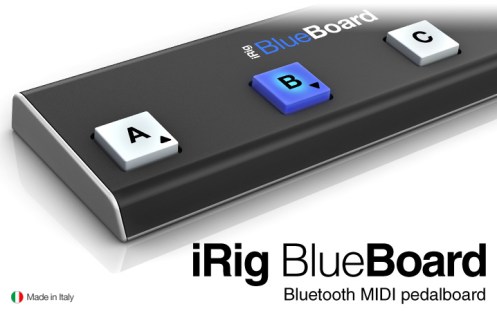
Are there easier ones to use that are specifically MADE for guitarists? Yes, you also have the iRig 2 as a low-cost option, an audio interface that looks like a guitar cable, and the iRig HD 2 which is a guitar/bass audio interface that has digital inputs/outputs for higher fidelity recording. To control effects naturally, you can also employ the iRig BlueBoard, a Bluetooth MIDI Foot pedal controller from IK Multimedia (really cool, and more natural for guitarists and bassists to control their software effects).

blueboard_webpage_cover_718x450

OK, so maybe you have an audio interface, but you have no idea how to record… What do you need to record your guitar? SOFTWARE. A natural software for guitarists and bassists to record with is called AmpliTube from IK Multimedia. It has stomps, amps, and something like 20,000 different amp/fx combos that you can use to craft your tone. It has multi-track recording too, and the ability to import music so you can record your guitars over it, and export as a final song.

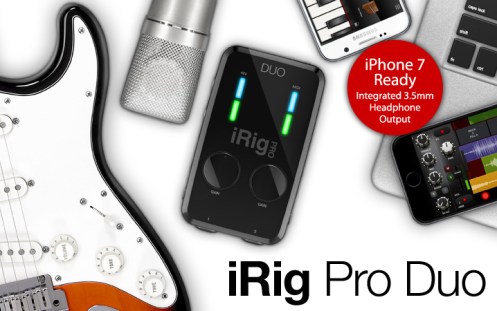
If you are using an iPhone, iPod touch or iPad, or Android, and want to plug your guitar or bass into it to record, you’ll need to try the iRig 2 or the iRig Pro DUO. The iRig is a quarter inch input for your guitar or bass, and also has an audio ouput (eighth inch) for headphones/speakers/PA system. What is the software to use with iRig? IK Multimedia’s “AmpliTube” again. AmpliTube for iPhone or iPad has recording options (4 and 8 tracks of recording, plus a host of amps and stomp models to choose from). You may download the AmpliTube software for FREE from iTunes (FREE99 is always the best price!). There is also a full version of AmpliTube from iTunes, and costs $19.99. IK Multimedia keeps coming out with new models of amps and effects for guitar and bass, so your rig will never be stale. You’ll just have to keep upgrading your rig for $2.99 per pedal…

I hope I was able to answer your question(s) about music production, technology and recording guitar. Thanks for reading Starr Ackerman’s Music Production Blog!