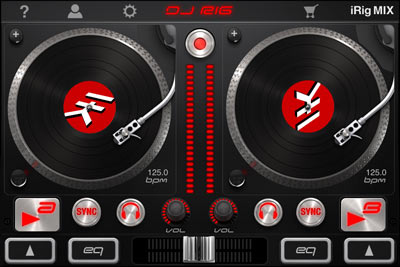
DJ Rig App is an App Store “Staff Favorite” after just two days on iTunes!

•March 9, 2012 • 1 Comment

Image

Ohhh yeah, you know the editorial at iTunes are probably having DJ scratch competitions right now! After a debut of only two days on the market, DJ Rig jumps into the homepage of the iTunes App Store as a Staff Favorite! For a limited time, DJ Rig is only $1.99, and that means you should go ahead and download it before the price raises.

Download DJ Rig from the iTunes App Store today, and spend your weekend completely addicted, partying in your bedroom, car, couch, or on stage with your built-in DJ skills! Click here to visit the App Store to download DJ Rig. Beef up your skills as a DJ and get ready for the iPad 3!

Click here to learn more about DJ Rig from the IK Multimedia website.

DJ Rig for iPhone

•March 9, 2012 • Leave a Comment

DJ Rig for iPhone

DJ Rig for iPhone, iPod Touch and iPad in landscape mode

How can I DJ using my iPhone, iPod touch or iPad? DJ Rig App is now available from iTunes!

•March 7, 2012 • 4 Comments

Everyone wants to be a DJ. If you have an extensive iTunes library, chances are that you are a MAJOR music enthusiast, and have possibly dreamed of spinning at a party for your friends…looking cool…rocking chicks (or dudes)..etc. Only problem is, you don’t actually have any DJ skills…so how can you learn to DJ, or at least sound like a DJ without really having the skill? The invention of the iPhone, iPod Touch and iPad have made it possible for your DJ wanna-be ass to be a majorly hot sounding party animal/professional DJ at your next house party… all you have to do is make a party playlist on your iTunes library, download the DJ Rig App from the App Store, and get to work!

Baddest MotherF*cker on Two Turntables GO OFF!

IK Multimedia’s DJ Rig app was released today in the iTunes App Store. What’s cool about it? Well, it’s mad cheap for one: introductory price of just $1.99. What else is cool about DJ Rig? Let me list all the phatness for you:

-Loads songs straight from your iTunes library. No fuss. Just mix.

Beat Matches automatically, and BPM synchs automatically  (here’s your built in automatic DJ skill) This feature is UNIQUE to the app world. Only REAL DJ software on Mac/PC can do this…

Shows BPM of the song, and also shows the album art of the vinyl DJ Deck

-When used with iRig MIX (soon to be released from IK Multimedia), it will automatically BPM synch (called X-Sync) to another audio source (like a real turntable or a CD player). This feature is UNIQUE to the app world.

DJ Rig has 12 effects you can use, like Stutter and Flanger, so you can pretend you are DJ Skrillex or Wolfgang Gartner and kill it on the iPhone/iPod/iPad  and mix up tracks as you go.

Records your whole DJ set, and you can send it to a friend!

-You will finally impress chicks, and you can SCRATCH like a motherfucker. Look at all the “not so hot” DJs out there in the world that have MODEL girlfriends. 🙂

These are just a few of the rad features of DJ Rig. But you get the idea. If you want to learn how to DJ, or you already DJ and need a new DJ app for your next gig, so you can ditch some of your heavy ass hardware…then DJ Rig is your dream come true.

Check out this video of Scratching with DJ Rig and iRIG MIX

Download the DJ Rig App from the App Store CLICK HERE

Thanks for reading Starr Ackerman’s Music Production Blog!

Here is a video of Starr Ackerman demonstrating the iRig MIX and DJ Rig to the media at NAMM 2012:

GarageBand released on iPhone, iPod Touch, but how do I record vocals, guitar, and MIDI?

•November 1, 2011 • 3 Comments

GarageBand for iPhone, iPod Touch on the iTunes App Store

Apple’s iOS music creation app phenomenon, GarageBand, is now available for the iPhone and iPod Touch in addition to the iPad. Yay for all music creators in the world with iOS devices! But how are these musicians going to record their vocals, guitar and MIDI keyboard information into GarageBand for iPhone? You got it…the IK Multimedia “iRig” line of music accessories! How do you take the #1 music app in the world and enhance that experience? Read below:

Let’s talk about vocals…You have a few choices out there, but everybody knows that condenser mics are the best for vocals, and iRig Mic is your direct microphone of choice here. Its not only a condenser, but also needs no other input method than direct input- straight into the headphone jack of your iPhone, iPod touch or iPad. Plug it in and record to GarageBand baby! Plus, the iRig Mic will work with ANY APP that will accept an audio input (doesn’t have to be for just recording music). What does that mean? Ever heard of karaoke apps like Glee? How about recording audio to the video app on your iPhone? Ever wanted a quality recording input for that? iRig Mic is your answer.

iRig Mic for recording vocals to iPhone, iPod touch and iPad using GarageBand, VocaLive, iRig Recorder or other apps accepting an audio input.

How to record Guitar and Bass to GarageBand for iOS? The iRig plug adapter is the  weapon of choice for a direct input to record into iPhone, iPod touch or iPad & iPad 2 with any app that will accept this input. The iRig plug adapter for guitar/bass/or any 1/4 inch instrument input needed will work for recording into GarageBand for iPhone, iPod Touch and iPad (any version). Not only that, but iRig will work for any app that needs a 1/4 inch input for getting your guitar signal, or instrument signal into your iDevice. Plus, the iRig allows for headphone monitoring (its an input, and an output, it has a headphone output!) while you rock on in your living room, or even on the stage.

iRig plug adapter for recording guitar and bass into your iPhone, iPod touch and iPad using GarageBand, AmpliTube, AmpliTube Fender or other app

But here’s the real deal question/fix of the century…Let’s fix a problem! Ok…so GarageBand for iPhone and iPod touch is a CORE MIDI compliant app. The iPhone or the iPod touch only has a small tactile user interface. How do I use a MIDI controller to access the tiny ass keys of the GarageBand app on my iPhone/iPod touch? Or, I want to play keyboards or the drums on GarageBand for iPhone, but I’d rather connect to my AKAI MPC or MPK and use the MIDI drum pads or keys to do it, so how do I connect a MIDI controller when the camera connection kit only works for iPad? Problem solved: You can connect ANY MIDI controller to work with GarageBand for iOS using the iRig MIDI connector. Yes, iRig again. Are you seeing a trend here? For more information on iRig MIDI, please click here to visit the IK Multimedia website to see all the apps that will work with iRig MIDI.

Thanks for reading Starr Ackerman’s music production blog. You are welcome to click on any of the iOS accessory photos in this article to learn more about the iRig producta for use with GarageBand for iPhone, iPod touch and iPad.

iRig MIDI for connecting your keyboard or drum machine MIDI controller to GarageBand, SampleTank, AmpliTube, AniMoog or any other Core MIDI compliant app for iPhone, iPod touch or iPad.

Making (Good) Music on Your iPad- SampleTank FREE + iRig MIDI – Video – Say Word!

•October 26, 2011 • 2 Comments

Up until now, musicians have been working with high-powered laptops and desktop computers to power their software synthesizers and samplers, romplers, etc to fire up bad-ass sounds and using them to make music. But technology has leaped once again, and tablet computers and cell phones are the new Macbook Pros and superdrive PCs. What??? Blasphemy? No, innovative software and peripherals make it possible, plain and simple. The toaster size CPU in your iOS device is now capable of pushing out just enough juice to get your “real-sounding” groove on. Say Word.

One fine example of an iOS music app and peripheral combo giving you the high-quality sound you have been looking for is IK Multimedia’s SampleTank for iPhone, and the iRig MIDI connector. Watch this video, or just close your eyes and listen, and try to tell the difference between a real grand piano, and the one this iPad is pushing.

Yes, ladies and gentlemen, your heavy ass laptop for your next live gig can be replaced with a smooth looking iPad, iPhone or iPod touch, and fits nicely in your purse/man-purse without all the hassle, because of software and hardware innovations like SampleTank & iRig MIDI. Again, Say Word.

Download SampleTank for iPhone/iPod touch, now available on the iTunes App Store. You can use SampleTank for iOS without iRig MIDI.

SampleTank FREE
Full operation with 8 instruments*
free download 
SampleTank
Full operation with 72 instruments*
for only $9.99 / €7.99 

Attention Keyboard Players and DJs: How do I connect a MIDI Controller to my iPad, iPhone or iPod Touch?

•August 25, 2011 • 3 Comments

How do I connect a MIDI Controller to my iPad, iPhone or iPod Touch?

DJs, Keyboardists and anyone who makes or creates music using a MIDI-enabled controller to trigger sounds from software have just been blessed with the Core MIDI apps coming on to the market for iOS products like the iPad, iPhone and iPod touch. But the question was, how can I connect my MIDI keyboard controller or drum machine to my iPad? You need a MIDI connection device right? Hellz yeah…and now IK Multimedia has come out with one called the iRIG MIDI. Here is the iRig MIDI video trailer to show you the sounds and functionality for iRig MIDI and SampleTank for iOS.

OK, so maybe you don’t know what MIDI is, well, here is another post of mine that may help you understand wtf MIDI is, and why you need it to get the most out of your computer music. Click here to read Starr Ackerman’s Music Production Blog Post: What is a MIDI controller and why do I need one to create music?

iRIG MIDI and SampleTank for iOS

iRIG MIDI and SampleTank for iOS

Now, more about the iRIG MIDI for your iOS device from the IK Multimedia website:

iRig MIDI is an ultra-compact standard Core MIDI interface for iOS that connects any MIDI compatible device to the iPhone®, iPod touch® and iPad®.

iRig MIDI connects MIDI keyboards, drum machines, drum pads, pedal boards and more to an iOS device to control not only the included SampleTank FREE* but also a world of MIDI-compatible apps such as GarageBand®. You can also use iOS apps to control external MIDI equipment such as sound modules, DAWs or lighting systems right from the mobile device.

iRig MIDI is the only compact iOS MIDI interface sporting 3 MIDI ports: IN/OUT/THRU. These connect to any standard MIDI jacks using the included 2 x 1.6m/5.2’ cables. iRig MIDI also has 2 LEDs for displaying the MIDI activity on the IN and OUT ports.

iRig MIDI also exclusively provides a micro USB port – with included cable – that connects to any standard USB power supply source so that the iOS device can stay fully powered during long sessions.

OK OK OK.… but what are some of the CORE MIDI Apps that I can use with iRig MIDI and a keyboard controller, drum machine or other MIDI-enabled device? Free apps included*: SampleTank FREE* the powerful sample-based sound module app and iRig MIDI Recorder FREE*

Plus all of these CORE MIDI APPS for iOS will work with iRig MIDI and more will be coming to the APP Store (for SURE)!!

There are currently over 50 apps that use the Apple Core MIDI standard and are therefore compatible with iRig MIDI for music production with your iPhone, iPad or iPod touch. The list continues to grow.

Download AmpliTube 3 FREE- Win Gear Credits to shop for amps and FX in AmpliTube’s Custom Shop!

•August 24, 2011 • Leave a Comment

AmpliTube Custom Shop

AmpliTube Custom Shop

Broadjam.com and IK Multimedia teamed up to bring you the easiest contest ever…

Guitarists, bassists, creative music producers/mixers and studio engineers are going to love this!

Enter to Win Gear Credits in AmpliTube’s Custom Shop Contest from IK and Broadjam!
Simply download AmpliTube 3 Free, and tell Broadjam.com your 2 favorite models
Visit Broadjam’s Blog Contest and enter by Sept 6, 2011 for your chance to win gear credits to go shopping in IK Multimedia’s AmpliTube Custom Shop. Musicians can enter by downloading AmpliTube 3 FREE and telling Broadjam.com about two of their favorite amps and effects. No purchase necessary to enter. 5 winners will be selected from Broadjam’s blog entries on Sept 7, 2011

From Broadjam and IK Multimedia, a chance to win 125 gear credits, or promo code, to go shopping in IK’s AmpliTube Custom Shop! 5 winners will be selected to win 125 each. Here’s the deal:

Musicians are welcome to download IK Multimedia’s AmpliTube FREE for Mac/PC, which includes the AmpliTube Custom Shop inside and comes stocked with an amazing 24 gear models to craft their signature guitar/bass tones, plus audition their favorite AmpliTube gear models like Orange, Soldano, Fender and more. Each model can be tried out for free (for a period of 2 days every 2 months) before purchase, the same way you would try out an amp in a real guitar shop.

Musicians may enter the contest simply by downloading AmpliTube 3 FREE, browse/audition their favorite gear models, and telling/posting on the Broadjam blog 2 of their favorite amps/effects and why they liked them. Five winners will be picked to receive 125 in gear credits to go shopping in the AmpliTube Custom Shop.

All entries must be posted by Sept 6, 2011.

Click here to enter the IK Multimedia and Broadjam.com AmpliTube Custom Shop Blog Contest.

Download AmpliTube 3 FREE right now to get started! Click here.
Good LUCK!!

Sing a Song, Post to YouTube and Win an IRig Mic from TLD Today and IK Multimedia!

•June 16, 2011 • Leave a Comment

Win iRig Mic from IK and TLD Today! – Sing a Song as a Video Response on YouTube!

Here’s your chance to win the iRig Mic, just for having some kind of video camera and a YouTube account….all you have to do to enter the TLD Today iRig Mic video contest  is make a video of yourself singing (it doesn’t matter WHAT or HOW GOOD you are either) and post it to TechFast Lunch and Dinner’s Contest Video as a video response. Two winners will be selected (and so far, there are already over 35 video responses to this contest!!- so you better get crack-a lackin!)

Check out the video of Jonathan Morrison from TLD Today telling you how to enter to win the iRig Mic with your video response.

Learn more about the iRig Mic, a condenser microphone for your iPhone, iPod Touch and iPad from IK Multimedia. You can use the iRig Mic with GarageBand for iPad, iRig Recorder, VocaLive, AmpliTube for iPhone, iPod and more.

GOOD LUCK!!!!! Some of these videos are funny as hell…

PS. They even gave me a shoutout! Thanks Jonathan~ Starr Ackerman ~ Public Relations for music software and hardware

GarageBand for iPad, iRig Mic and iRig help to Cover “The Strokes” by YuriWongMusic

•May 4, 2011 • Leave a Comment

What is the microphone to plug into GarageBand for iPad, and how do you plug in your guitar/bass? Well this video from YuriWongMusic shows iRig Mic and the iRig plugged into the iPad…with a badass cover of The Strokes!

IK Multimedia’s iRig interface adapter and iRig Mic, a multipurpose hand-held condenser microphone, are the perfect tools to get high-quality audio into your iOS device.  These top innovative audio input devices can be used to produce great tracks with Apple’s new GarageBand for iPad.

Check out this amazing video where Youtube.com/YuriWongMusic covers “The Strokes- You Only Live Once” song using GarageBand app for iPad, IK’s iRig to plug in their guitar and bass, and using iRig Mic for vocals.

Happy Earth Day! What are we doing here? Making Muzac….Dramarama!

•April 22, 2011 • Leave a Comment

Dramarama’s “What are we gonna do?” is one of my favorite songs of all time. And I like this video that this kid made to remind everyone what the F we are doing here, and to make the most of your time on this planet. Love your parents, because one day they will be dust…I know I miss mine every single day….and love yourself, and enjoy the ocean, the desert and everything else that your ears can hear, your face can feel or your eyes can see.

What would the world be without music. Try making some today!

Love to All- Happy Earth Day! ~ Starr Ackerman

PS. My favorite lines of Dramarama’s lyrics are wrong though, and it always reminded me of when the real Earth Day was! They say “It’s April 21st, and everybody knows today is Earth Day, Merry Christmas, Happy Birthday to who’s ever being born.” Yeah…Earth Day is April 22…lol.