The reviews are in, “That Speaker is so Loud!”, iLoud – 40 Watt Bluetooth Speaker/Amplifier

•November 12, 2013 • 1 Comment

IK Multimedia iLoud Bluetooth speaker reviews

IK Multimedia iLoud, 40 Watt Bluetooth speaker, amplifier.

IK Multimedia iLoud, 40 Watt Bluetooth speaker, amplifier.

iLoud Launch Day Review Quotes The sound is most impressive. I thoroughly enjoyed listening to Queen’s We Will Rock You, The Beatles, While My Guitar Gently Weeps and Louis Armstrong’s take on Hello Dolly.”  “The iLoud delivers a solid performance in a small footprint. if you need that crisp clean sound and extra power for your performance and wireless capability for streaming your tunes, then iLoud would certainly more than fit the bill. And for musicians, it’s a great choice.  iLoud’s portability and the ability to plug that guitar or dynamic mic right into the iRig enabled jack and play live, makes it for a funky 40w amplifier.” Greg Gazin, Canoe.Ca, Gadget Greg http://blogs.canoe.ca/canoetech/product-review/review-iks-new-bluetooth-portable-speaker-is-certainly-iloud/ I’ve been clinging to a quixotic dream of replacing the pedalboard with an iPad and a small Bluetooth pedalboard. With the recent of release of the BlueBoard and the iLoud, I was able to start trying to make my dream a reality. Guitarists don’t need to lug around huge pedalboards anymore if they want to tap into a variety of sounds. The BlueBoard and the iLoud are up to the task. I was really happy with the iLoud as well. The on-board iRig is nice, and since it doesn’t use the main connector on your iOS device you can charge your device while playing through it. It gets plenty loud enough…” Mark Crump, GigaOM, CNN Money http://gigaom.com/2013/11/09/eliminating-my-guitar-pedalboard-with-ik-multimedias-blueboard-and-iloud/ http://money.cnn.com/news/newsfeeds/gigaom/articles/2013_11_09_eliminating_my_guitar_pedalboard_with_ik_multimedias_blueboard_and_iloud.html

 “It’s…markedly better in treble and clarity than the Big Jambox and Braven 850 HD, rendering songs with additional layers of apparent depth that make the same-priced speakers sound flat. This new accessory is one of the best-sounding portable Bluetooth speakers we’ve tested. Overall, iLoud is a very good portable Bluetooth speaker—superior in audio quality and top volume level to similarly priced rivals, and equipped with musician-specific benefits.”

Jeremy Horwitz, iLounge.com http://www.ilounge.com/index.php/reviews/entry/ik-multimedia-iloud-portable-personal-studio-monitor/#UKsz5QyGl0HzOO6Q.99 After wirelessly pairing the iLoud with my iPad, I raised the volume. At the mid-point, the iLoud was already as loud as typical wireless Bluetooth speakers. By the time I reached the loudest volume setting possible, my wife made a comment that confirmed the product’s namesake.  She said, “That speaker is so LOUD!” Oh yes, it was loud alright. So loud in fact that I could see compression of air pulsating from the rear opening with every deep bass beat. Yet even at that volume, the audio was crisp and clean, not at all saturated by muddy over modulation.” Mike Riley, iPhone Life http://www.iphonelife.com/blog/177/iloud-review

 “I’ve been using the iLoud for a few days now with Netflix and have been amazed at how much I can actually hear on these movie soundtracks that would otherwise remain hidden.”

iLoud is the ideal speaker for musicians and audiophiles who demand an accurate reproduction of a wide range of musical styles from rock, hip-hop and electronic dance music, to more nuanced and sonically demanding genres like jazz, classical and acoustic.” David Cox, The Examiner http://www.examiner.com/review/iloud-studio-monitor-speakers-have-escaped?cid=rss

 Before I even plugged my guitar into the iLoud, I connected my iPhone via Bluetooth and turned on A Pale Horse Named Death. With the bands heavy bass, I figured I could distort the speakers with the first song and be done with it. I was wrong.”

“When the song started playing, I sat back and smiled. The song wasn’t just loud, it was clear. The bass was pumping through, heavy guitars were screaming and there was no distortion whatsoever.” “I tried a number of other songs and bands, in a variety of genres, with the same results. It just sounded really good.” “The other part of the iLoud that sets it apart is that you can plug your guitar into the device. IK Multimedia made this so simple, it’s amazing.” Jim Dalrymaple, LoopInsight       http://www.loopinsight.com/2013/11/07/review-ik-multimedias-iloud/

 IK Multimedia designed an audio system with musicians in mind. I have had a chance for a first look, and it is awesome. What impressed me from the start was how portable and light iLoud was … well, honestly that was the SECOND thing that impressed me. If it wasn’t for the tremendous sound coming out of the speaker, nothing else would have mattered.” “But once I heard iLoud in action, I noticed everything else. The ease of connecting my iPad using the 3.5mm cable, or plugging in a guitar directly to the 1/4 jack; the ease of pairing devices to iLoud over Bluetooth made getting started easy, and allowed all of us to take turns sharing our music.”

Michael Anderson, Gear Diary http://geardiary.com/2013/11/07/ik-multimedia-iloud-hands-on-first-impressions/ “It sounds great. Even if you’re not a musician, iLoud is one of the best-sounding portable speakers you’re going to find that’s this compact. It’s a 40 watt sound system that lives up to its name – a front-facing dial surrounded by a red light (steady when on, pulsing when in low-power mode) lets you turn it up until it gets really loud.” “Ultimately, iLoud plays to IK Multimedia’s core strength as a tool for musicians. If you’re familiar with IK’s Amplitube or VocalLive and you can get the sound you want out of its collection of effects processors, iLoud goes from being a great-sounding playback speaker to a great-sounding performance speaker.” Peter Cohen, iMore http://www.imore.com/hands-ik-multimedias-new-iloud-speaker

iLoud Bluetooth Speaker/ Amplifier – Hear the difference – comparison videos!

•November 6, 2013 • Leave a Comment

Until now. the mobile music revolution was just a dream…but this may be the final piece to your puzzle (how to have the best PA, Bluetooth speaker, or small amplifier that fits in your backpack) for gigs, home life, and just general partying. The answer? iLoud. 

The specs: 40 Watts (freaking 3 to 5X louder than anything else you’re able to get for a Bluetooth speaker). The website says 2 to 3x, but if you listen to the comparison videos…I would think differently. Also, has an input on the back, so its an AMPLIFIER – instant PA system for someone needing a direct input for a microphone, bass, guitar, keys…or any other LINE level instrument. This feature makes it unique in the market, and besides being loud as f***, its definitely worth plugging into and playing through. Not only that...pair it with your phone or iPad and just play tunes, DJ at your next party…or, for the musician, use it as a personal portable studio monitor! Flattened frequency response will ensure you get the best representation of the sound while creating and performing music on your iOS device or BTLE enabled device. Plus, it has 7-9 hours of Li-ion battery life. Awesome!

Okay, enough with the gushing…so here are the comparison videos so you can make YOUR OWN DECISION 🙂

Here are comparison videos for a very popular “pro-sumer” BT speakers on the market (which I might add, none have an input for a line level instrument, and therefore, iLoud is unique in the market as also being a 40-watt BT speaker + amplifier!)

iLoud vs other popular speakers – Part 1

iLoud vs other popular speakers – Part 2

iLoud vs other popular speakers – Part 3

To learn more about iLoud from IK Multimedia, please visit the IK Multimedia website, click here.

Thanks for reading Starr Ackerman’s Music Production and Technology Blog.  Never Stop Making Music!


MIDI Controllers for iOS and Mac/PC : iRig KEYS and IRig BlueBoard (iRig PRO + iRig MIDI)

•October 22, 2013 • 1 Comment

Every musician knows that you need some kind of tactile setup to work with your computer, iPhone, iPad or iPod touch in order to really start “feeling” how you’re making music. For example, you can play a piano on an iPad screen, or, you can play a piano keyboard and get a totally different sound because your fingers are touching the keys…or banging on the keys…its a totally different effect. So what am I trying to say? You need a MIDI controller in order to achieve this, and you’re in luck, because technology has allowed you to acquire these things for your iOS devices and computer.

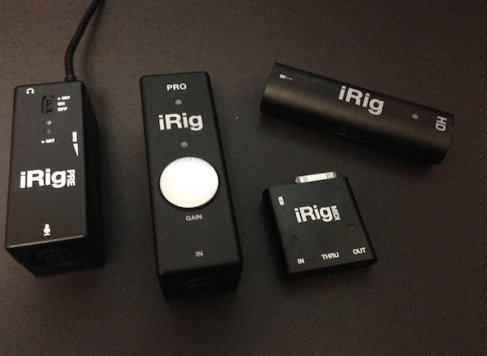
If you like using IK Multimedia apps and products, and are using an iOS device or Mac, then you have 4 options: iRig MIDI, iRig KEYS, iRig PRO, and iRig BlueBoard. Here’s the lowdown:

iRig MIDI: You already have a MIDI piano keyboard or other some kind of MIDI controller (like an MPC), and you want to connect it to your iOS device. From the IK website: 

iRig MIDI is the only compact iOS MIDI interface sporting 3 MIDI ports: IN/OUT/THRU. These connect to any standard MIDI jacks using the included 2 x 1.6m/5.2′ cables. iRig MIDI also has 2 LEDs for displaying the MIDI activity on the IN and OUT ports.

iRig MIDI also exclusively provides a micro USB port – with included cable – that connects to any standard USB power supply source so that the iOS device can stay fully powered during long sessions.

iRig PRO: You have several devices, you’re a one man/woman recording band…from the IK website:

iRig PRO is the first full-featured compact audio and MIDI interface you can use with your XLR microphones, your guitar and bass, your keyboard or other line-level source and your MIDI controllers. It features an XLR/1/4″ combo jack for connecting microphones and instruments (accepts XLR and 1/4″ TS cables), and a MIDI input for plugging in your favorite controller.

OK, OK…so maybe you just wanna play keys…and you want a frikken keyboard that you don’t have to put in a suitcase, instead, it fits in your backpack! iRig KEYS is the halo on top of your angelic music making head. Here’s the skinny from the IK website:

iRig KEYS is the first ultra-slim and highly portable universal MIDI controller keyboard for iPhone, iPod touch, iPad and Mac/PC. iRig KEYS connects directly to the iOS device’s 30-pin dock connector, Lightning connector (Lightning cable must be purchased separately), or the USB port on your Mac/PC. It features 37 velocity-sensitive mini-keys — a full 3-octave range plus one note — takes up minimal space on your desktop and can easily fit in a backpack or a carry-on bag.

Are you a guitarist, bassist, keyboardist, or vocalist using an iOS device or Mac to perform on stage or produce music? Then iRig BlueBoard is your answer…this nifty Bluetooth pedalboard allows you to recall presets and program changes with the tap of your foot. Yeah baby, no more touching the screen…no more stopping your groove…just set it up, and jam. Here’s the MIDI controller for you, (details are from the IK website):

So how does iRig BlueBoard work? It connects to your iPhone/iPod touch/iPad or Mac via Bluetooth, and when you press its foot switches, it sends out control signals that are converted to MIDI by the iRig BlueBoard app.

At this point the MIDI messages are available to virtually any MIDI compatible app you’re running on your iOS device or on your Mac.

The control messages sent from iRig BlueBoard to AmpliTube or other Core MIDI music apps can include bank up/down, MIDI continuous controllers, as well as parameter changes on apps such as IK’s AmpliTubeVocaLive,SampleTank, and iGrand Piano iOS apps plus many others, such as Apple GarageBand.

Learn more about IK Multimedia’s MIDI controllers, iOS apps and interfaces, click here: www.ikmultimedia.com/ios 

Thanks for reading Starr Ackerman’s Music Production & Technology blog. Please feel free to comment or contact me for review units of the aforementioned products via IK Multimedia, click here.

“Sound of Contact” performs an all-iOS band show in NYC with IK Multimedia apps/peripherals

•October 1, 2013 • Leave a Comment

When you can replace all of your gear and go out and play a live show by shoving almost everything into your backpack, then you just can’t deny that the “Mobile Music Revolution” has begun. At the end of the summer, I had the honor of being part of producing a live show featuring “Sound of Contact” playing an all IOS performance, recreating their songs and using only iPads, and IK Multimedia’s apps and peripherals. Here is a video from the ‘iRig Gig” – from the Engadget/ Gdgt Live show in NYC.

Who are they and what are they using?

This video shows “Sound of Contact” – which is Simon Collins on vocals (son of Phil Collins), Dave Kerzner on Keyboards, and Matt Dorsey on guitar. Simon is singing through an iRig Mic, using the VocaLive app on his iPad. Dave Kerzner is using the iRig KEYS, plugged into his iPad, running SampleTank (for keyboard sounds and drums). Matt Dorsey is playing his guitar through AmpliTube, using an iRig HD. This band was able to recreate and perform some songs from their new album (on iTunes) for a stage performance by using just IK Multimedia’s apps, peripherals and iOS mobile devices. It was quite a show! They also had some of the original touring members of Pink Floyd singing through VocaLive and playing through AmpliTube.

Click here to learn more about Sound of Contact, and click here to learn more about playing and performing music live on your iOS mobile devices from IK Multimedia.

Music I Love: “Safe and Sound” by Capital Cities: Video

•September 25, 2013 • Leave a Comment

Once in a while you hear a mainstream song that makes you want to dance, then you watch the video for the first time and realize that the band made the whole video about dancing! Not only Breakdancing, but even some West Coast Swing action: Super double awesome! Here are the video and lyrics for “Safe and Sound” by Capital Cities.

Safe and Sound lyrics:

I could lift you up
I could show you what you wanna see
And take you where you wanna be

You could be my luck
Even if the sky is falling down
I know that we’ll be safe and sound

We’re safe and sound

I could fill your cup
You know my river won’t evaporate
This world we still appreciate

You could be my luck
Even in a hurricane of frowns
I know that we’ll be safe and sound

Safe and sound
We’re safe and sound
Safe and sound
We’re safe and sound
Hold your ground
We’re safe and sound
Safe and sound

I could show you love
In a tidal wave of mystery
You’ll still be standing next to me

You could be my luck
Even if we’re six feet underground
I know that we’ll be safe and sound

We’re safe and sound

Safe and sound
Safe and sound
Hold your ground
Safe and sound

I could lift you up
I could show you what you wanna see
And take you where you wanna be

You could be my luck
Even if the sky is falling down
I know that we’ll be safe and sound

I could lift you up
I could show you what you wanna see
And take you where you wanna be

You could be my luck
Even if the sky is falling down
I know that we’ll be safe and sound

We’re safe and sound

Hopeless, by Starr Ackerman – Song and Video

•September 21, 2013 • 1 Comment

I made this song called “Hopeless” and video for it in 2010, before my mom died. I played the song live before it was totally finished at a club in NYC owned by “Fall Out Boy” called “Angels & Kings”, for the “Art by Chance” show. I rode NJ transit to the gig. Most of the film is me and my mom, in the hospital before she died. I kept bringing her cats to see her, Marley (calico) and Fibber (blondie).

The audio is from a live performance, so you can hear people in the background.

I miss my mom dearly, no one knows this loss more than those who have lost their mom to a long-term illness. This song/video is dedicated to Marie Moran, Fibber McGee and Marley, who will always be in my heart.I love you. ~ Starr Ackerman

Recording and Performing Vocals on the iPad: VocaLive app + iRig Mic, video

•September 20, 2013 • Leave a Comment

Yeah yeah yeah…you want to record vocals, but you want them to sound like an angry alien? Maybe a dirty old hoe from back in the day? Or maybe you want to sound like a tranny who’s hit rock bottom and thinks she’s Rihanna? Well, whether or not you actually sound like the guy-version of Rihanna, you can do it all with VocaLive for iPad and the iRig Mic. Not only that, but you can set up multiple presets or “favorites” and take your bad ass on stage and do it all. And if you actually have talent and can sing, then VocaLive has the ability to make you sound even better…AND>> just in case you had a few drinks before you hit the stage- pitch correction is there to “assist you” in working that mic.

So anytime you want to break out the iPad and record your ideas…yep, you got the sketch pad for it, baby. VocaLive for iPad gives you 1 -track of recording for free, and the ability to upgrade to 8 tracks of recording, so you may overdub to your heart’s delight! Plus, pull in somebody else’s vocals, and add a guitar track, and add the full song, whatever. Bounce it all down and send it to the record label, or be your own record label and use Tunecore!

Have an iPhone, or iPod touch? Well, you can still use VocaLive, baby. The only difference is that you can upgrade to 4-tracks of recording.

Did I mention that it’s great for Karaoke? Or how about Broadcasting? VocaLive is perfect for both…can make you sound great with its natural sounding Reverb and EQ settings.

OK, so now the real question, where do I get VocaLive? The iTunes App Store.

2nd question? Where do I get a microphone that plugs directly into my iPhone, iPod touch or iPad (and even Android) that won’t empty my wallet? iRig Mic from IK Multimedia is your best bet – only costs $59, and you can get it from all the major consumer electronics and music stores like Guitar Center. The iRig Mic is a condenser microphone, perfect for recording vocals, guitars or even interviews. It has three sensitivity settings, so you can basically kill the background noise or mike something 15 feet away if needed.

Here is a video demo of iRig Mic and VocaLive that we made from the NAMM show. I was showing it to CJ Pierce, guitarist from “Drowning Pool”. It’s pretty funny, and gets the point across. Enjoy~

Learn more about VocaLive and iRig Mic from IK Multimedia, click here.

Thanks for reading Starr Ackerman’s Music Technology Blog.

How do I connect my guitar, keyboard and microphone to iOS or Mac?

•September 19, 2013 • 2 Comments

How do I connect my guitar, keyboard and microphone to iOS or Mac without buying tons of different connectors? 

Basic scenario for people trying to record their vocals, guitar, bass, keyboards and other line-in instruments means different connectors for each device, especially when using iPhone, iPod touch, iPad or Mac...unless you have an MBox or other high quality analog to digital conversion audio interface for your Mac, it used to mean that you would have to buy a connector for each instrument. Not ANYMORE! Now, if you want to consolidate (and not spend a crapload of cash on several different connectors for XLR/ 1/4 Inch and MIDI, your answer is the iRig PRO from IK Multimedia! Here is a picture and a quote from iLounge’s review of the IRig PRO:

Image


ILounge’s editor, Jesse Hollington said, “With iRig PRO, IK Multimedia has done a extremely impressive job of combining three of its most useful iOS accessories into a single device at a pretty reasonable price point, without losing much in the process. You’re basically getting an improvement upon the $40 iRig PRE, an equal to the $100 iRig HD, and the MIDI input capabilities of the $70 iRig MIDI in a single $150 package.”

And here is another great review quote from TechnologyTell’s editor, Jake Gaecke, “…what’s so great about the iRig PRO is its versatility. Not only can it be your guitar adapter, but it can also be your microphone input, electronic drum set input, MIDI keyboard input and more. It might just be the only adapter you need.”

Click here to learn more about recording and making music with your mobile device and the iRig PRO.

Billy Morisson shows off iRig HD and AmpliTube Studio for iPad: Video

•September 18, 2013 • Leave a Comment

Check out this video from Billy Morisson, showing how to make a song with iRig HD and AmpliTube for iPad from IK Multimedia. Billy Morisson is a well-known and sought after guitarist, who tours with Billy Idol and also is a member of the band “Camp Freddy.” He says its a “mobile recording studio”, and shows you how a song he created comes to life using iRig HD and AmpliTube.

Watch the video of Billy Morisson using AmpliTube Studio for iPad and iRig HD, click here.

Learn more about iRig HD and AmpliTube for iPad, visit the IK Multimedia website, click here.

The Mobile Broadcasting Revolution: Recording Audio/Video on iOS

•September 17, 2013 • Leave a Comment

I just got back from a presentation in NY for a HIGHLY reputable broadcasting network (If you live in the USA, you know its one of the big four for news -not including CNN). I stood in front of around 25 people all asking the same question: how can we make it easier for our field reporters to get the audio/video back to the station so we can edit faster? Well, till now, there hasn’t been a way for field reporters to work easily with handheld recorders that have wifi/phone capability to record video/audio and upload it to a central database so the tech teams can start editing and production can send it on-air. Solution? IK Multimedia’s iRig products and iOS software.

Let’s start with the first question: What kind of hardware do I use to record the audio into my iPhone or iPad for broadcasting/podcasting? Well, right now, you have tons of choices for microphones. Easy to use & Affordable? iRig Mic ($59 US) or iRig Mic Cast ($39.99 US) plug directly into your iOS mobile device (Android too). Have your own microphone? iRig PRE allows you to connect it to your iOS mobile device (Android included again). Want more connections in one device, maybe you have a microphone that works with XLR and another that’s a line in? iRig PRO (has XLR, 1/4 inch and MIDI, pretty sweet!).

Now, I have the gear, but what software do I use to record the broadcast/podcast with and send it directly to the studio? iRig Recorder (works on both iOS and Android), and the full version has the capability to export directly to an FTP if you want to. iRig Recorder is basically, “check levels, hit record, review, and send to studio”. Easy peasy. Want something with more studio service capability inside the app? VocaLive for iPad and iPhone has tons of effects like Reverb, Parametric EQ, Pitch fix, etc, to make your podcast sound more interesting/natural (insert creativity here). Both apps are available from the iTunes App Store as free versions, but you might as well go ahead and pay for the full versions, since they’re the ones you need to access all the goodies.

Here is a video for iRig Mic Cast in action:

Soon, most apps will be compatible with IOS 7 compatibility. This means that certain IOS apps will have the ability to work inside other apps (or in tandem) so you can get the best sound, while working simultaneously with another app. An example of this would be, opening Apple’s GarageBand and then opening VocaLive or AmpliTube inside it and using them together. It’s called Inter-App Audio. This would be the same for video apps having the ability for inter-app audio, an example of this would be (insert video app here) and using VocaLive or iRig Recorder with it to capture sound. In the past, you would have to spend hundreds of dollars on each piece of software to be able to do this…now, you can get apps from the App Store for $20 and under…making the podcasting/broadcasting for mobile devices the most affordable option (now being considered by VERY LARGE NEWS networks for their reporters to use). Professionals and newbies are paying the same price for the gear and the software…. tis the start of the Mobile Broadcasting Revolution…and exploring IK Multimedia products are a great starting point.