For Girls (and boys) GM Diet Day 4, weight loss article: 1.4 lbs lost – 5.6 lbs total!

•July 24, 2014 • Leave a Comment

Day 4 of the GM Diet, Weight Loss Review:

Yeah baby! There is nothing like getting on the scale every day and seeing that sucker move down! On day 4, I have lost another 1.4 lbs on the GM Diet. That makes a total of 5.6 lbs for following the diet for 3 days, since I weigh myself right when I get up in the morning.

I have to admit, I think the constant shed is a combination of the low calories, unprocessed food and exercise. Every day so far, I have eaten nothing but fruit and veggies, and today’s diet is “3 glasses of skim milk and 4 bananas” (plus 10 glasses of water and vegetable soup if I want it). I have also exercised every day (yesterday I went to the gym during lunch, and last night my boyfriend and I went bowling…sober!)

I will also admit that I was sweating a LOT during lunch at latin dance class today. Jeez. My teacher noticed and said something about it. Whatever! Then afterward, I was kinda spacey. I had a little bit of a hard time concentrating on work until I had another serving of milk and bananas.

Seriously though, I’m wondering if I will actually lose ten lbs or more on this diet by Day 7 (or Day 8)? Tomorrow is Day 5 – 20 oz of beef and 6 tomatoes. Wow…wondering if I will actually be that hungry???

Want to read the GM Diet guidelines for day 4? Click here.

SampleTank 3 Released from IK Multimedia! Watch the video!

•July 24, 2014 • Leave a Comment

Pro audio lovers have been waiting for the new version of SampleTank to come out for a loooooong time now! And from the new features and dazzling sounds offered in SampleTank 3, it has been well worth the wait!

Check out this video of SampleTank 3 for an overview of the amazing sounds inside – 33 GB library, 4000 instruments!

Visit the IK Multimedia website to get the feature list of this hot, new virtual instrument/standalone version of SampleTank 3, click here.

Thanks for reading Starr Ackerman’s Music Production Blog.

For Girls (and boys): Day 3 of the GM Diet, weight loss article – Lost 2 more lbs! 4.2 Total so far!

•July 23, 2014 • 1 Comment

GM Diet Day 3 Weight Loss:

I was hesitant to step on the scale this morning…I thought maybe I would wait another day so I wouldn’t be discouraged and stop the diet. I felt that way for exactly one minute and then stepped on the scale. I got on and off 3x just to make sure the scale was working (digital), and I lost another 2 lbs! That makes 4.2 lbs of weight lost for just two days of eating properly on the GM Diet plan.

I was pretty stoked! Until I went to the gym during lunch, and sweated BALLS trying to work out…I ended the workout in 30 mins, light weight lifting, squats, a lot of pilates and stretching.

Also, last night at the beach volleyball match, I was huffing and puffing a lot (which doesn’t usually happen either). Although, I was very focused during all 5 games and played well!. We played for a little over two hours.

It also sucked having to walk up to the tiki bar afterward to find my boyfriend (drunk) and my dog (sober, I think) and not order a nice, refreshing fruity cocktail. Alcohol is forbidden on the GM diet. Some sites say that you are allowed two glasses of white wine OR champagne (that’s it) for the whole 7 days. I also read on a lot of reviews that when people drank the alcohol, they didn’t lose weight. So screw that…I can wait.

Day 3 of the GM diet is supposed to be a mix of veggies and fruit. I’m cool with that. I liked the fruit part (cherries and cantaloupe), and the veggie part is going to be the pea/tomato soup I made yesterday. YUM.

Still stoked about the 4.2 lb weight loss. I want the scale to keep going down! Yay!

Click here to learn more about the GM Diet on Day 3.

Continue reading my experience of the GM Diet on Day 4, click here.

For girls and boys: Day 2 of the GM Diet, weight loss article (2.2 lbs lost!)

•July 22, 2014 • Leave a Comment

Last night my boyfriend at a whole DiGiorno stuffed crust pizza by himself. I’m thinking to myself, what a jerk!!! LOL. He knows I can’t eat anything but fruit on Day 1…whatever.

This morning was cool. I stepped on the scale and lost 2.2 lbs! Yay! I know its only water weight, but still it made me feel good to see the scale budge.

Day 2 of the GM Diet is supposed to be all veggies, 10+ glasses of water and one boiled potato in the morning. I had the potato, well, half of it. Not used to eating potatoes for breakfast. I finished breakfast with half a cup of peas. I like peas.

After work, I have beach volleyball. The suckiest part about this diet is that I won’t be able to join the teams after the match for wings & beer. Sad face.

Last night, all I could think about was steak. Weird, since I’m not a huge steak person. But I convinced myself to just get through day 1, and Day 2 should be easier. We shall see.

I juiced some celery so I could stand eating it…made about 20 oz of juice. I hope it cools me down for tonight’s volleyball game, it’s really hot out there. Supposedly, celery juice is supposed to cool your body temperature, so its good to eat/drink juice on hot days if you’re going to be outside.

I made a bangin’ soup because I couldn’t really think of eating salad all day without any dressing…So I will share the ingredients since I think they are all legal on Day 2 of this diet. This recipe makes one bowl (one serving)

My bangin' Pea Soup in tomato broth. Day 2 of GM Diet.

My bangin’ Pea Soup in tomato broth. Day 2 of GM Diet.

1 Cup of water

1 and 1/2 tomatoes – diced

1/3 can of peas (no salt added)

1 clove of elephant garlic – diced

1/3 red onion – diced

3-4 sprigs of fresh basil – cut up

Pepper

Throw it in all together and boil until the garlic and the tomatoes look mushy. And there you have it. Bangin’ Pea Soup with tomatoes, etc. (I bet it would taste awesome if I could have thrown in some shellfish).

Continue reading my experience on the GM Diet, click here to read day 3’s results.

VocaLive 2.0 for iPhone, iPad, and iPod touch released!

•July 22, 2014 • 3 Comments

Check out the video of VocaLive 2.0 for iPhone, iPad and iPod touch.

From the IK Multimedia Press Release:

The new VocaLive 2 studio

The newest feature in VocaLive 2 is its Studio section. Designed to compliment VocaLive’s Recorder section, it allows for a full degree of editing and composing flexibility with recorded tracks. Now musicians can see and manipulate their audio tracks (up to 4 on iPhone and 8 on iPad) as waveforms on a timeline grid, just like on a computer digital audio workstation.

Clips can be easily moved and adjusted with a simple gesture. Its grid feature provides “snapping” of regions to the timeline for precise and easy positioning. Audio regions can be manipulated with a full set of standard commands and controls: cut, copy, paste, delete, normalize, split, crop and more. Now, with VocaLive 2, it’s never been easier to record, edit and arrange complete songs while on the move.

Powerful vocal effects

At its core, VocaLive continues to be all about outstanding vocal processing effects. VocaLive includes 5 “Vocal Effects”: Pitch Fix (for pitch correction or stylized quantization), Choir (a 3-part harmonizer), Morph (a pitch and formant shifter that changes the tonal quality of the voice from subtle deepening to radical gender bending), DeEsser (a sibilance remover) and Double (a voice doubler). It also includes 7 “Studio Effects”: Reverb, Delay, Parametric EQ, Compressor, Chorus, Phazer and Envelope Filter.

VocaLive features 3 effect “slots” on iPhone and 4 on iPad, where users select the effects they want to use and chain them together. VocaLive’s intuitive interface makes it easy to reconfigure effect chains to explore your creativity and make wildly new sounds. Favorite chains can be saved to a user preset bank or assigned to one of four “favorites” buttons for fast recall. VocaLive’s full MIDI compatibility allows its presets to be controlled by compatible foot controllers like IK’s wireless iRig BlueBoard.

Price and availability

VocaLive 2 is a free update for all existing users and it’s available now on the App StoreSM both as a free or paid app for iPhone/iPod touch or iPad for only $11.99/€10.99 for new users. The new studio feature is available as an in-app purchase for $9.99/€8.99 on iPhone and iPod touch and $14.99/€13.99 on iPad for users who have already purchased the multitrack Recorder, or at a special “Total Studio Bundle” price of $17.99/€15,99 on iPhone and iPod touch and $26.99/€23.99 on iPad that also includes the multitrack recorder.

For more information, please visit

http://www.ikmultimedia.com/vocalive

For Girls (and boys): The GM Diet Day 1, weight loss article

•July 21, 2014 • 3 Comments

Soooo I have been trying to lose weight since February of 2014, going to the gym like 3-7x per week…I got to the point where I was running 5 miles on the treadmill, but kept looking at the scale and watching it stick in the same spot. If you have ever been an over-achieving gym rat, you could understand my frustration after hitting a plateau when I lost 15 lbs. After I lost 15 lbs, the scale never moved again, no matter what new exercises I tried, food I ate, etc. I even stopped drinking for like 10 days and still, nothing. Pissed off? Totally!

So, I met this gym owner and she looks like she’s cut to the hilt…60+ years old and she admits to me that she drinks wine everyday and smokes out…lol. She tells me my problem is my diet. So I started checking out Ketogenic diets, and accidentally found an iOS app for something called the “GM Diet”. It was free, so I downloaded it. The claim on it was you could lose up to ten lbs in 7 days. Well, if you read anything I wrote before, even losing 5 lbs in one week sounded awesome to me… So I stalled on doing the diet until the weekend was over. Today is Day 1 of the GM diet. I weighed myself in the morning (uggh, same weight as last 4 months), and said to myself, I can do this for 7 days. What if I lost 10 lbs? Awesome!

I also read that some lady did this diet back to back 2 weeks before her wedding and lost 25 lbs. I don’t know if its true, but if I can handle doing two weeks (or more?) of this GM Diet, its worth a try.

It’s around 7pm now and I haven’t been too hungry or anything. I ate fruit and drank a shit ton of water (at least 7 glasses already). I still went to the gym and worked out during lunch. My knee was bothering me so I didn’t schedule a dance lesson for tonight. Hopefully, I can do that tomorrow. No headaches, but have been visiting the bathroom a lot. No coffee…no tea. Just water and fruit. Mostly watermelon, cherries and cantaloupe. My boyfriend came home from work and had a beer. I wasn’t jealous. We’ll see how long that lasts…I love to drink wine.

Click here for a link to the GM Diet, so you can see what you’re supposed to eat for each of the 7 days.

Continue reading my experience on the GM Diet, click here to read Day 2’s results.

EZ Voice and iRig Voice – for the beginner recording & karaoke peeps!

•July 16, 2014 • 1 Comment

How can I start recording my vocals?

Do you like to sing? Do you find yourself singing along to your favorite songs and think you might even sound better than Beyonce sometimes? Why not take your first dive into recording that song with her voice canceled out and your voice in its place, along with cool effects to make you sound even better??!!!

IK Multimedia's iRig Voice microphones. Low-cost, fun and flirty colors, made for beginners of recording vocals and karaoke stars!

IK Multimedia’s iRig Voice microphones. Low-cost, fun and flirty colors, made for beginners of recording vocals and karaoke stars!

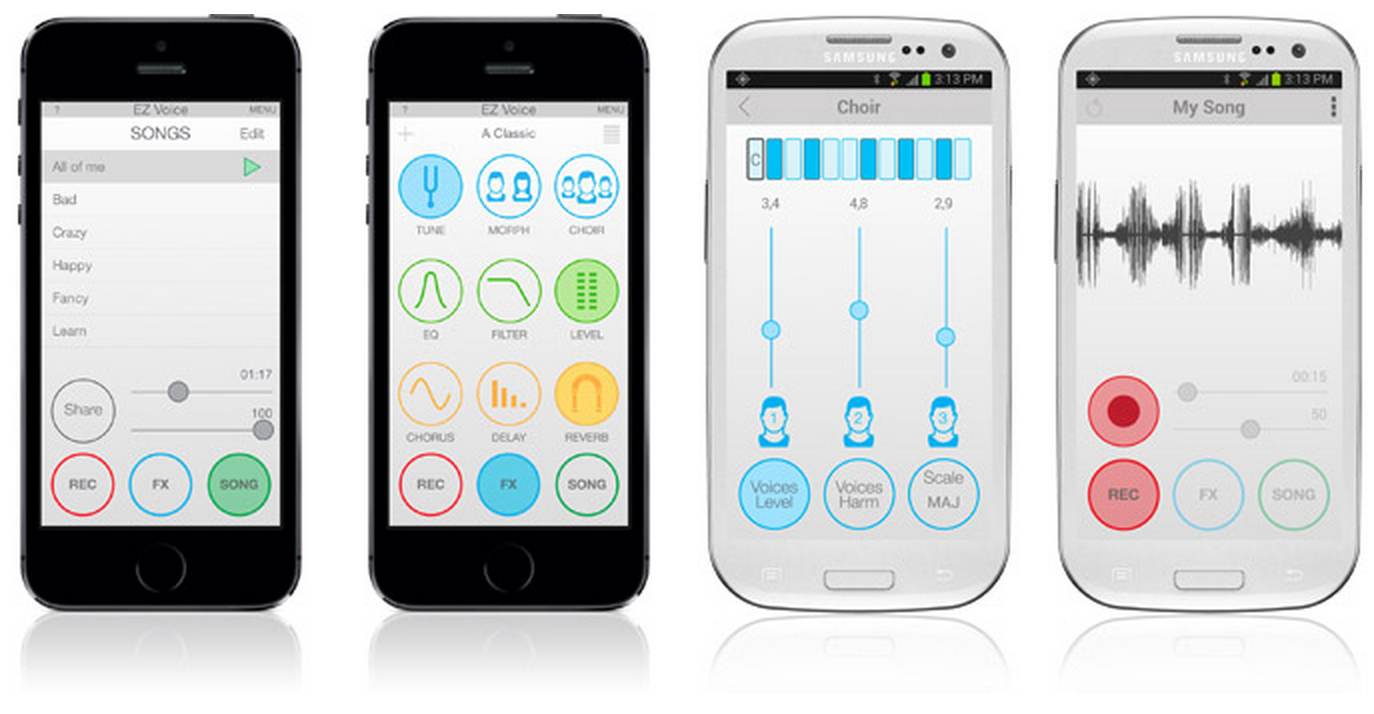
IK Multimedia’s EZ Voice is a free app from the App Store, or Google Play store, that will let you import your favorite songs right from your sound library, then you can cancel the “voice” of the singer and sing over it, using cool effects like the pros use, called “delay, auto-tune and reverb”, record yourself, and then send it/share it with a friend or to SoundCloud. Cool right?

EZ Voice, a free karaoke and recording app with tons of features, and easy-to-use.

EZ Voice, a free karaoke and recording app with tons of features, and easy-to-use.

How do you get the sound into your iPhone, iPad, iPod touch or Android device? The iRig Voice microphones are low-cost, fun and flirty, and come in 5 colors, just the same as the iPhone 5c. They are just $39 from your favorite music or electronics retailer (or from the IK Multimedia online store). Plug this microphone into the audio jack of your device (where you plug in your headphones) and you can plug your headphones into the separate audio output on the iRig Voice’s cable. This way you can hear yourself singing, or you can output the sound to computer speakers (using and 1/8th inch to 1/8 inch cable) and hear yourself out loud.

How to plug in iRig Voice, and output to headphones or speakers.

How to plug in iRig Voice, and output to headphones or speakers.

Check out this video of people singing with the iRig Voice and EZ Voice combo. Looks like a lot of fun, right?


For more information about EZ Voice and the iRig Voice microphones, please visit the IK Multimedia website. Click here.

How do I connect a MIDI controller or keyboard to my iPhone, iPad or Mac/PC?

•July 14, 2014 • Leave a Comment

This is a question every budding musician asks themselves when trying to construct a computer music studio, “How do I connect a keyboard or other MIDI controller to my mobile device or computer so I can make music?” There are some new products on the market that can help, considering what you might already have in the studio. Here are some easy-connecting solutions for your iPhone, iPad, iPod touch and Mac/PC computer:

New: IK Multimedia iRig MIDI 2: It’s all about the Connection…and the Ports

From IK’s website:
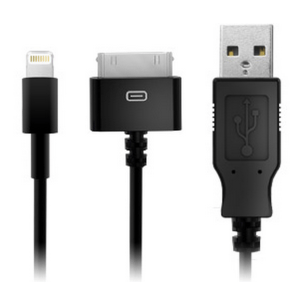
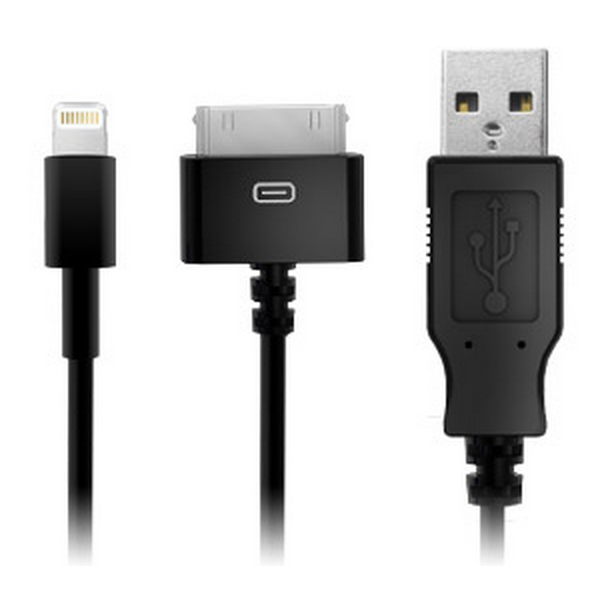
Connectors for iRig MIDI 2, include Lightning, USB and 30-pin (may be purchased separately).

Connectors for iRig MIDI 2, include Lightning, USB and 30-pin (may be purchased separately).

At the center of iRig MIDI 2 is its detachable Mini-DIN connector, which lets you attach a Lightning (included), USB (included) or 30-pin cable (sold separately) depending on the mobile device or computer that you’d like to use. This makes it possible for you to use it with your iPhone, iPod touch, iPad Mini, Mac, PC etc. There’s a list of compatible devices from the IK website for iRig MIDI 2, click here.

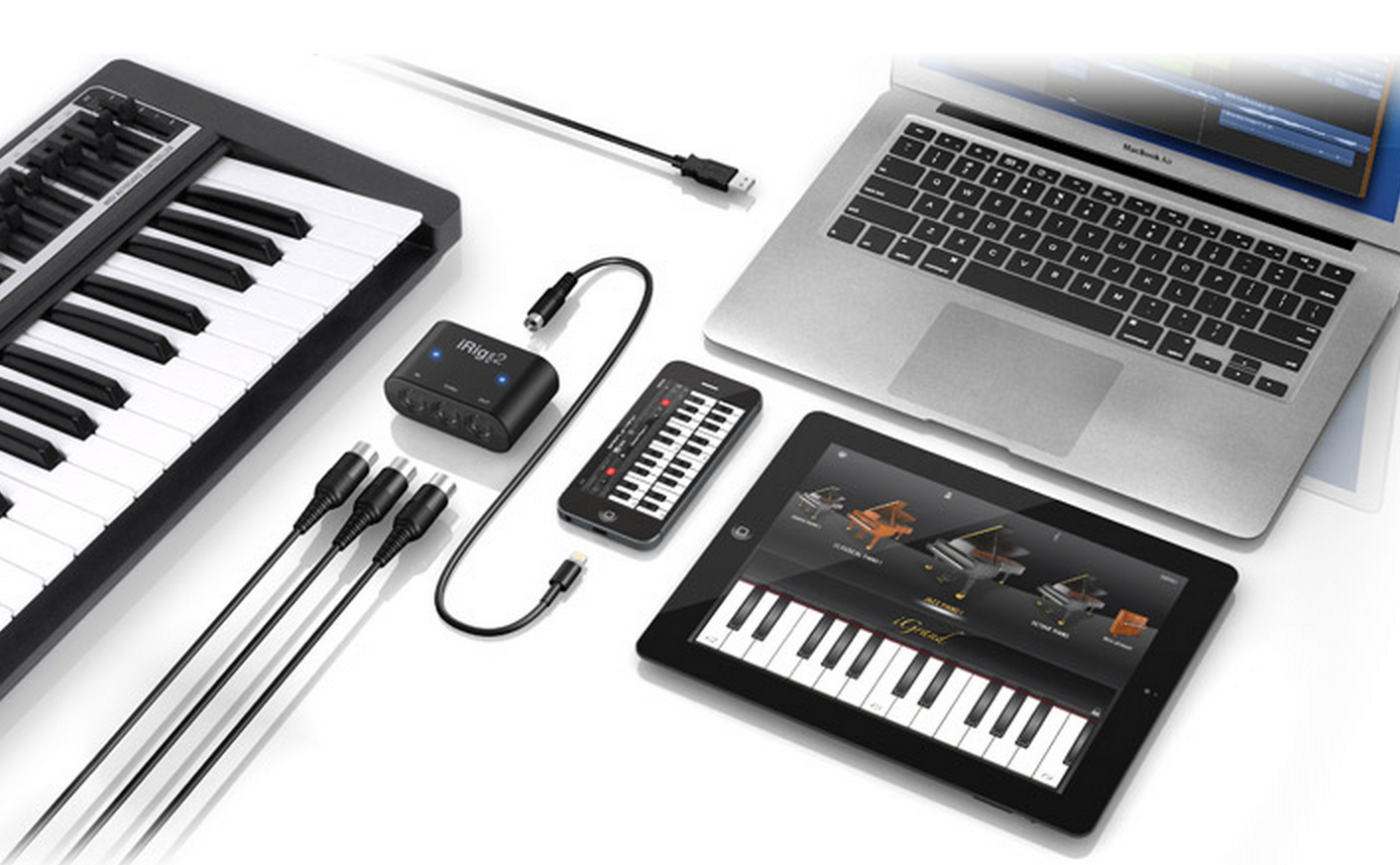
Attach at computer, iPhone, iPad, iPod touch, external MIDI controller keyboard, etc to make music with your mobile device or computer.

Attach at computer, iPhone, iPad, iPod touch, external MIDI controller keyboard, etc to make music with your mobile device or computer.

iRig MIDI 2 features three MIDI ports: IN, OUT and THRU. The ports are standard-sized and require no adaptor or special cable to use — in fact, you can use any standard MIDI cable you’d like. These ports give you all the control and connectivity that MIDI allows: Use the IN port to use external keyboards and controllers to play your favorite software sound modules and synthesizers. Use the OUT port to control external hardware or synthesizers from your mobile device or computer. And you can use the THRU port to send MIDI data to multiple instruments at once.

Still confused? Watch this iRig MIDI 2 Video from IK Multimedia, click here.

__________________________________________________

OK, so you don’t have a MIDI Keyboard, or other MIDI controller, but you want to make music? Here are some more IK Multimedia products that can help you plug in and play!

From the IK website:

iRig KEYS with Lightning is MIDI and USB class compliant for a true plug-and-play experience both with iOS devices or Mac/PC. No additional apps, software or drivers are necessary to get it up and running. For total mobility, iRig KEYS with Lightning is also an ultra-low power consumption unit.”
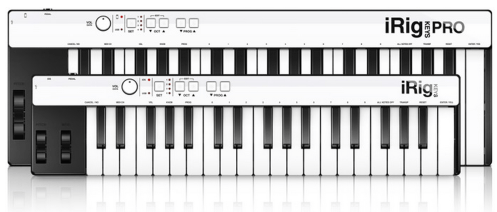
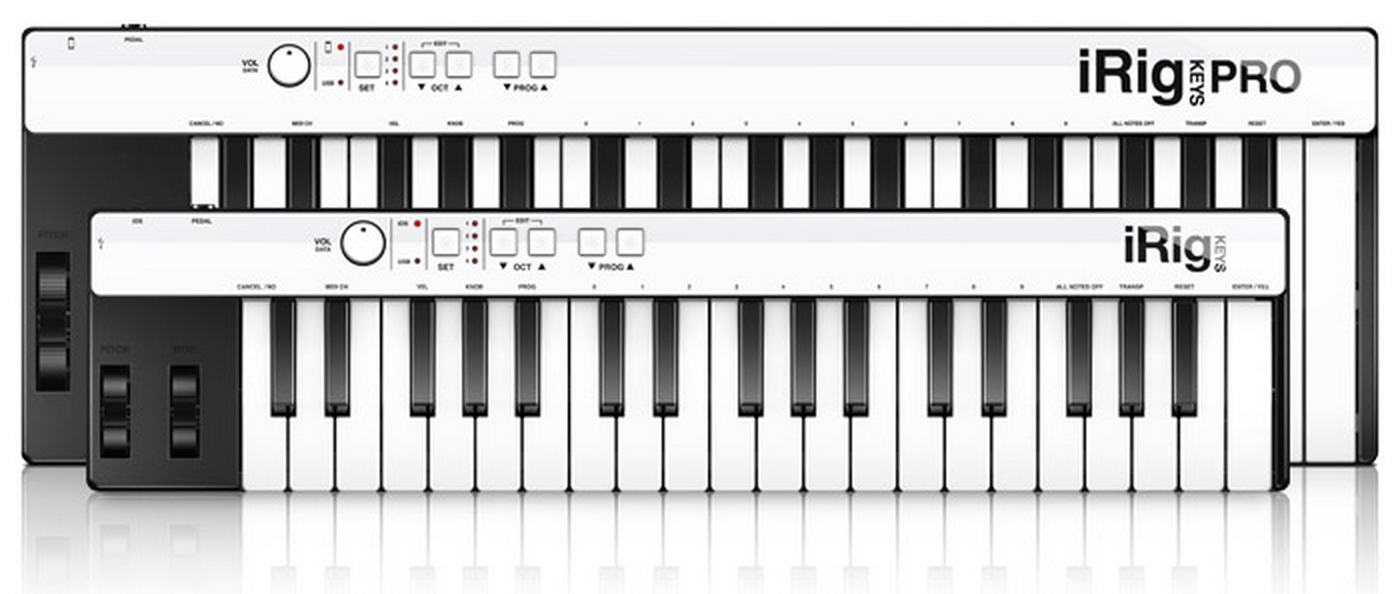
iRig KEYS and iRig KEYS PRO from IK Multimedia, affordable mobile MIDI controllers with USB, 30-Pin and Lightning adapters.

iRig KEYS and iRig KEYS PRO from IK Multimedia, affordable mobile MIDI controllers with USB, 30-Pin and Lightning adapters.

There are two flavors of iRig KEYS. iRig KEYS (37 velocity mini-keys keyboard controller) and iRig KEYS PRO (37 FULL-Size Keys MIDI controller). What are the differences between the two? Well, if you have a backpack, the smaller version (iRig KEYS) is going to fit in there, making it very easy to get around town with just your laptop, or iOS device in tow. The iRig KEYS PRO version is going to be a Full-sized key keyboard controller…which some people prefer to use in the studio (since they might be used to using real piano-sized keys). There is also a cost difference between the two (iRig KEYS costs less money).

Both iRig KEYS and iRig KEYS PRO work equally well in true ease-of-use situations. You won’t need any special software or drivers to install and use these products. Your computer or device will automatically “know” how to use them. If for some reason your computer DAW can sense multiple controllers, you will have to choose iRig KEYS in your “preferences” for MIDI controllers for it to be the main mamma jamma.

Still confused? Here is a video of iRig KEYS PRO in action, click here to watch the video.

———————————————————————————————–

Of course, there are many different keyboard controllers and MIDI adaptors on the market, but none are so versatile and easy to use with all devices to make music with than the three aforementioned products. It’s important to purchase products that will work with new mobile devices, tablets and computers, this way you won’t have to re-invest immediately if you get a new laptop or mobile device.

Thanks for reading Starr Ackerman’s Music Production Blog. ~ Keep Making Music!~

Introducing ModeAudio’s new website, sample libraries, sound packs and more!

•July 8, 2014 • Leave a Comment

ModeAudio is a brand new loops, samples and soft synth presets provider, specializing in audio packs that are versatile, work straight out of the box and, of course, sound incredible!

ModeAudio’s loop and sample packs are created specifically for the best DAWs available, featuring extra production tools beyond the core audio material. Examples include Ableton Drum Racks, FL Studio DirectWave patches, Reason Combinator presets, Logic channel strips and more. All integrate seamlessly within their host software, cutting out unnecessary legwork and speeding up the process of transforming ideas into music.

From Dubstep to Ambient, EDM to Hip Hop, ModeAudio’s sound libraries are typically aimed at specific genres but are always built with flexibility and utility in mind. This ensures the sound packs have the scope to excite producers working in other styles too.

Check out ModeAudio’s website for regular articles covering soft synth tutorials, DAW tips, music tech news and beyond.

To celebrate their website launch, they’re offering 3 for 2 on their entire catalogue. From vintage analogue synth loops, intricately recorded found percussion hits, presets, patches and more, there is something to inspire everyone.

http://modeaudio.com

USA Today Video: iRing – the future of motion control for musicians on mobile devices

•February 28, 2014 • 4 Comments

Jefferson Graham from USA Today interviewing Starr Ackerman on IK Multimedia's iRIngs

In this video from the NAMM 2014 show in Anaheim, California, USA – USA Today’s Jefferson Graham interviews Starr Ackerman from IK Multimedia on the future of motion control for iOS/Mac & PC for musicians, called iRing.

iRing is the first motion-tracking controller for iOS music apps and more. iRing is a patent-pending, double-sided ring with dotted markers that allows the user to control effects, notes or other music parameters by waving their hands in front of the iOS device’s camera. The camera detects the motion control, and you can set the MIDI parameters that you want to affect via the software you are using.

Learn more about MIDI control for your music apps, visit the IK Multimedia website, click here.

Starr Ackerman / IK Multimedia / Public Relations